Who can do what
Volunteer Management v2 has five levels. Each one is decided in a different place, and they nest: everything a team leader may do, a coordinator of that ministry may do too, and so on up.
| Level | How you get it | What it lets you do |
|---|---|---|
| Administrator | the Admin flag on the user | everything |
| Manage Ministries | the Manage Ministries switch in the user editor (custom permissions) | a global ministry manager: every ministry — create, deactivate, delete, set whether it provides teachers for Sunday School, grant coordinators and team leaders, and everything below |
| Ministry coordinator | the Manage My Ministries switch in the user editor plus a coordinator grant on the ministry page | the Ministries heading, the dashboard and the pages of the ministries they coordinate, including creating and deleting those ministries' events; nothing over any other ministry. May deactivate their own ministry but not delete it, may not change its Sunday School switch, and may not grant coordinators, but may name the team leaders of their own ministries' teams |
| Team leader | a team grant (the Team leader field of the team dialog), for a staff member or a member who signs in to the Member Portal with their email | their team — its positions, schedules, staffing needs and assignments — from the Member Portal's My Teams pages; with Manage My Ministries on a staff login, also the Ministries heading with the Ministry Dashboard. A team leader cannot create events unless their login also has Add Events |
| Volunteer | any member | their own schedule and answers, proposing a substitute for their own dates, and signing up for open dates of positions they are qualified for |
Where each is granted
-
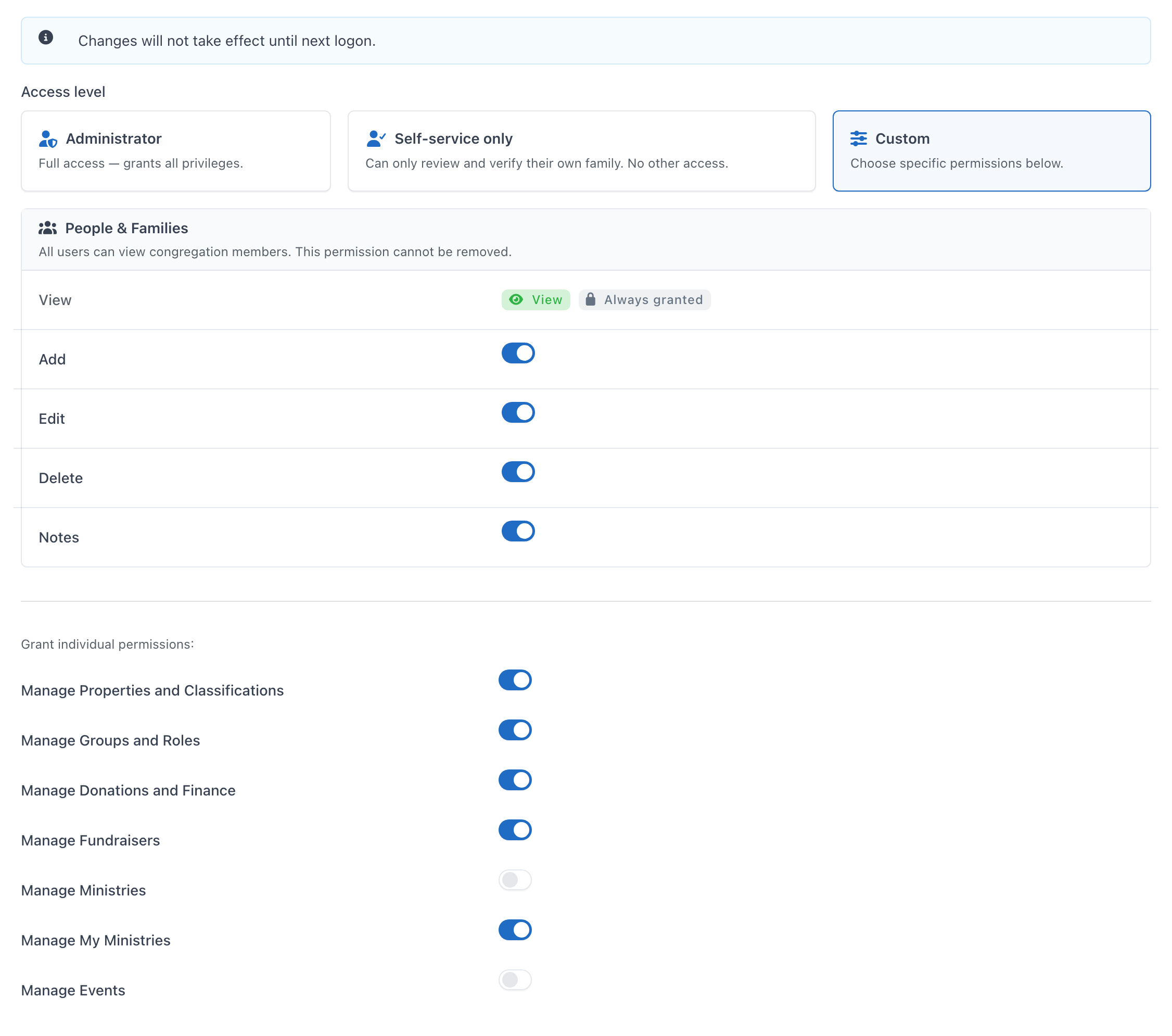
Manage Ministries and Manage My Ministries are switches on the user editor (Admin → System Users → edit → Permissions → Custom → Grant individual permissions), between Manage Fundraisers and Manage Events. The user page lists both. See User Management.
-
Coordinators are granted on the ministry page, Overview → Ministry Coordinators → Add coordinator (administrators and Manage Ministries users only).
-
Team leaders are named in the Team leader field of the Add team / Edit team dialog on the same tab, by administrators, Manage Ministries users and that ministry's coordinators.
Grants are given to the person, not to a login, so they can be made before the person ever signs in. A member who signs in to the Member Portal by email can lead a team, and runs it from My Teams; being a coordinator needs a staff account with Manage My Ministries. In the portal, team leadership is the Manage a team and Decide substitute requests portal permissions, which come from the Team leader field; an administrator can also give them to one person for one team. Staff permissions add nothing in the portal: an administrator who leads no team has no My Teams.
A Manage My Ministries user who neither coordinates a ministry nor leads a team has no Ministries heading yet; opening the dashboard's address shows the Permission Required page, which names what is missing ("Manage My Ministries access, with a ministry or team to manage"). Turning the switch off removes the Ministries heading.
A team leader without Manage My Ministries (a member who signs in by email, or a staff account without the switch) runs their team from the Member Portal's My Teams only. The Ministry Dashboard, the ministry pages and the occurrence pages turn them away, even when the address is typed by hand, and the alert emails they receive link to the date on My Teams instead (see Volunteer email and reminders).
What each level sees
| Where | Administrator / Manage Ministries | Coordinator | Team leader (staff login with Manage My Ministries) | Volunteer |
|---|---|---|---|---|
| Sidebar Ministries heading | Dashboard + every ministry | Dashboard + their ministries | Dashboard only | not shown |
| Ministry Dashboard | whole church | their ministries | their team's dates | — |
| Ministry page | every ministry | their ministries | — (their team is on the portal's My Teams) | — |
| New ministry, Delete, Add coordinator | yes | no | no | — |
| Team leader picker in Add/Edit team | yes | their ministries' teams | no | — |
| Deactivate / Reactivate a ministry | yes | their own | no | — |
| Can this ministry provide teachers for Sunday School? in Edit ministry | yes | sees it, cannot change it | no | — |
| Calendar tab: New event, New recurring event, Delete events | yes | their ministries | no | — |
| Ministries that may add events on a church calendar | only with Add Events (administrators have it) | no | no | — |
| Assign, record responses, approve substitutes | everywhere | their ministries | their team | own dates only |
| Events of a ministry (create, edit, delete) | yes | their ministries, even without Add Events | only with Add Events | — |
| Admin → Ministry Settings | administrators only | — | — | — |
The screen is not the gate: every action is checked on the server, so a URL typed by hand for another ministry lands on the Permission Required page.
Related pages
Can't find what you need? Ask in Discord, or open an issue on the ChurchCRM repository.