People
A Person record represents an individual in your congregation. Person records can be grouped into Families, belong to Groups, have Properties assigned, and can be made Users of the application.
Tip: Every person should belong to a family, even if they are a "family of one."
Step-by-step: Adding a Person
- Go to People → Add New Person.
- Enter a Last Name. That is the only required field. First name can be left blank.
- Choose a Family if this person belongs to one. Family is optional. You can also create a new family from the same form.
- Enter Classification (Member, Guest, and so on) if you use classifications.
- For a child, choose a Grade if you track school grades.
- Add address, phone, and email, or leave them blank to inherit them from the family.
- Enter a birth date only when you have the month and the day. A birth year by itself is rejected with Invalid Birth Date: Missing birth month and day. Age is calculated from a complete birth date.
- Click Save or Save and Add to add another person.
Tip: To add several people at once, use the Family Editor. A new family starts with four member rows. Add Another Family Member appends another row. There is no limit of 10.
Membership Date: what it means
Membership Date records the date your church considers a person to have joined. It is optional: leaving it blank does not stop you from saving a person. Your church decides which date to record according to its own membership records and rules.
To set or correct it, open a person's record, choose Edit, then find Membership Date in the Church Membership card. Save the person. When a date is present, the Person View displays Since followed by that date. Clearing the field and saving removes the stored date.
What the date does—and does not do
- Membership Date and Classification are separate fields. Selecting a person classification such as Member does not fill in a Membership Date, and entering a date does not change the classification. A person can have either field without the other.
- Membership Anniversaries, under Reports → People Reports, uses the date's month. It can also be filtered by classification; the report is not restricted to people classified as Members.
- Administrators can import the
MembershipDateCSV column and can export person records, optionally including Membership Date and filtering by a date range. - The date does not grant application permissions or make someone eligible to vote. Membership of a group named Board or Voting Members also does not automatically grant voting rights or software user access. The church determines membership and voting eligibility under its own bylaws. A separate structured voting-eligibility feature has been proposed but is not available in ChurchCRM 7.8.1.
In ChurchCRM 7.8.1, the Person Editor allows users with Edit Records, or Edit Self for their own or same-family record, to open the editor. The Membership Date field has no additional field-level permission check there. It must not be treated as protected proof of voting eligibility or as an authorization control.
How do I find a specific person?
Use the search field in the page header. Its placeholder is Search people, families, groups…. Results appear as you type. People matches look at first name, middle name, last name, email, work email, and home, cell, and work phone, and only living people are included.
Clicking a person's name opens their Person View, which lists the information on that person, including properties, groups, and notes.
This is a wildcard search. Searching for "ian" can return "Ian" or "Brian" when those letters appear in a name, email, or phone that is searched. See Find people and families for the other result types.
Active and inactive people
Person records can be made inactive without deleting their history. Use Set Inactive on the Person View when someone should no longer appear as an active person. Use Set Active to reactivate the record later.
The Person Listing shows active people by default, with options to view inactive people or all people. Making a person inactive does not delete the person, their family relationship, giving history, notes, groups, or other records.
You cannot deactivate the person record associated with your own signed-in account.
Pending self-registrations
A person who signed up on the public registration form, and has not been approved yet, shows a Pending review badge on the person list and the Person View. The same badge appears on the family. Those people are omitted from the printed directory until someone with Edit Records approves them on Self Registrations.
Marking a person as deceased
Deceased is not a classification and not a choice in a list named Deceased.
- Open the person and choose Edit.
- In Church Membership, check This person is deceased.
- Enter the date of death when you know it. The date field can be left blank. If you save with the box checked and no date, ChurchCRM stores today's date.
- Save the person.
Clear the checkbox to undo the mark.
The person record, pledges, payments, notes, and history stay in place. Header search only returns living people. Voting-member reporting excludes deceased people.
Administrators hide deceased people from the printed directory and from CSV exports with People → Admin → People Settings → People → Hide Deceased from Directory. The setting text is Hide deceased members from the printed directory and CSV exports.
Timeline
The Person View timeline shows notes, attendance, emails, and system activity, newest first and grouped by year. Filter chips are Notes, Events, Emails, and System. Each chip shows how many entries it holds, and several can be on at once. Notes is on when the page opens. Show all turns every chip back on. There is no date-range filter and no Type list of "Notes only" or "Attendance only."
Long notes show a short preview. Read more opens the full note.

The Emails chip, which appears once ChurchCRM has emailed the person, shows those emails in the timeline alongside notes and attendance. See Email History below.
Email History
ChurchCRM keeps a record of every email it sends. A person's history holds the emails addressed to them: messages written in the email composer, birthday greetings, family verification links, account emails (new account, password reset, lock and unlock, deletion), notifications, and volunteer emails from Volunteer Management v2. Anyone who can open the person can see it.
Recent Emails card
The Recent Emails card on the Person View lists the five latest emails to that person, newest first:
| Column | What it shows |
|---|---|
| Date | When the email was sent |
| Type | What kind of email it was: Message (written in the composer), Birthday greeting, Family verification, Password reset link, New account, Notification, and so on. Volunteer emails show Volunteer assignment, Volunteer reminder, Volunteer declined, Volunteers needed, Volunteer sign-up, Substitute proposed, Substitute decision, or Offer to help. An email of a kind ChurchCRM does not know shows Email |
| Subject | The subject line; click it to open the email |
| Status | Sent, Failed (the mail server refused it; hover over the badge for the error), or Skipped (email sending was turned off, or no mail server was set up, at the time) |
| Sent by | The user who wrote it, or Automatic for emails ChurchCRM sent on its own |
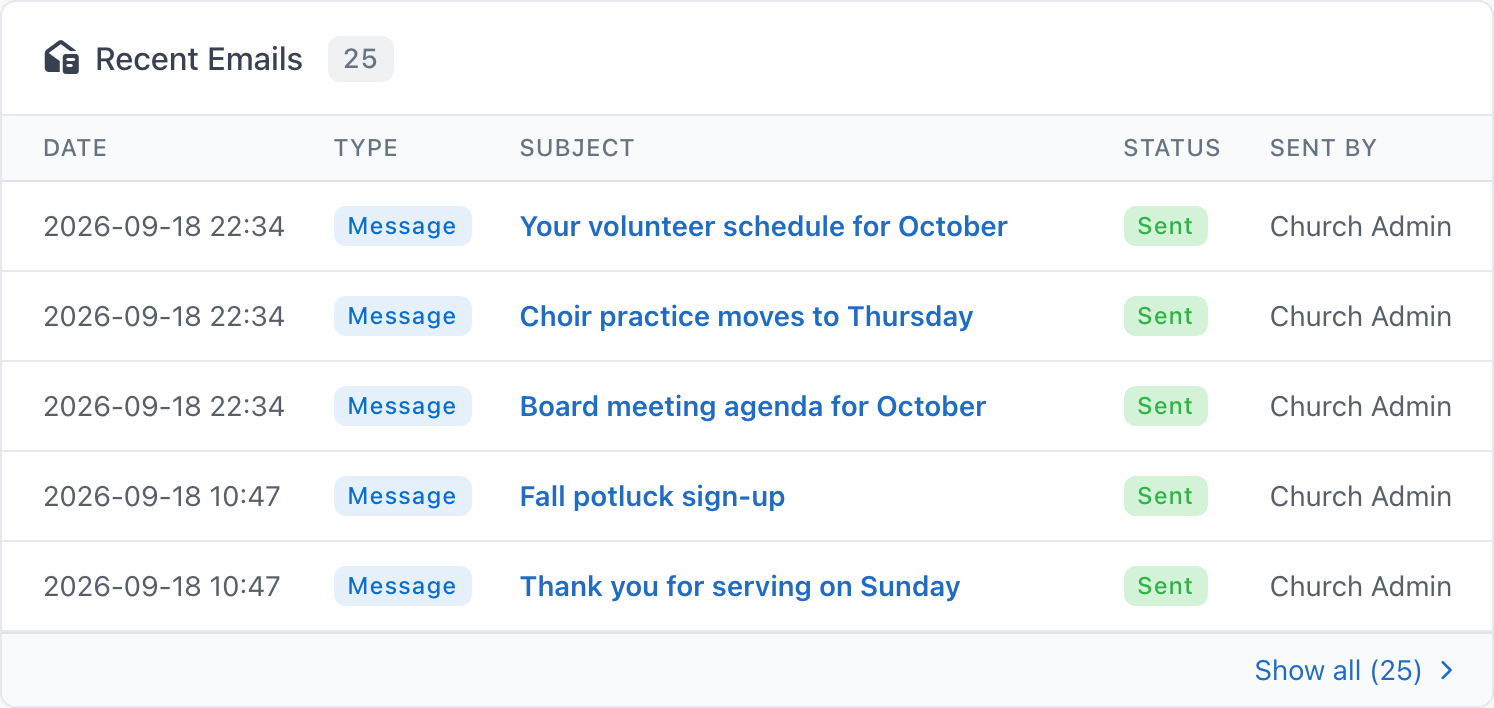
The badge next to the title is the total number of emails on record for this person. If nothing has been sent yet, the card says so.
Opening an email
Click a subject to see the email as it was sent, with the recipient address, date, type, status, and sender above it.
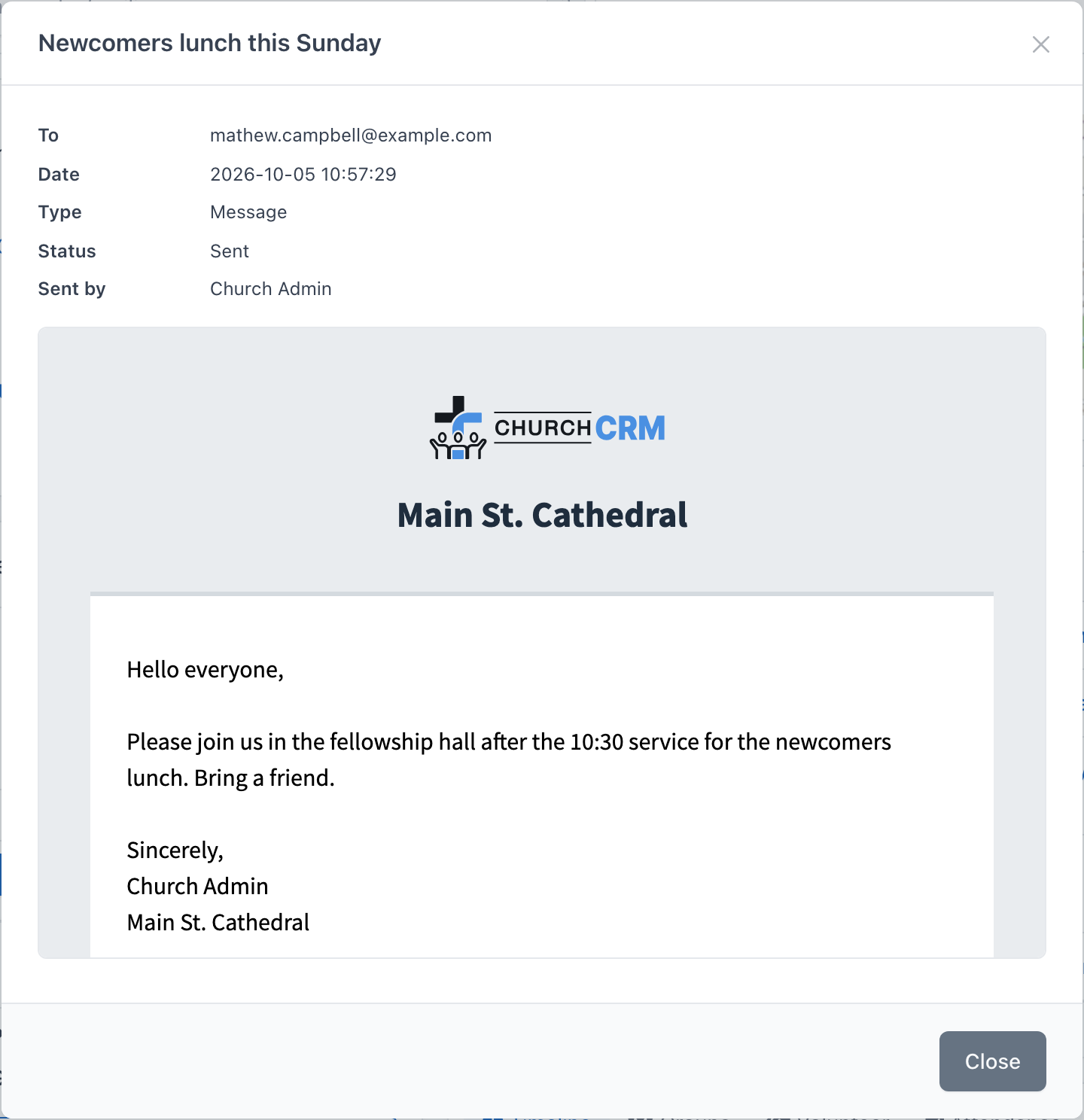
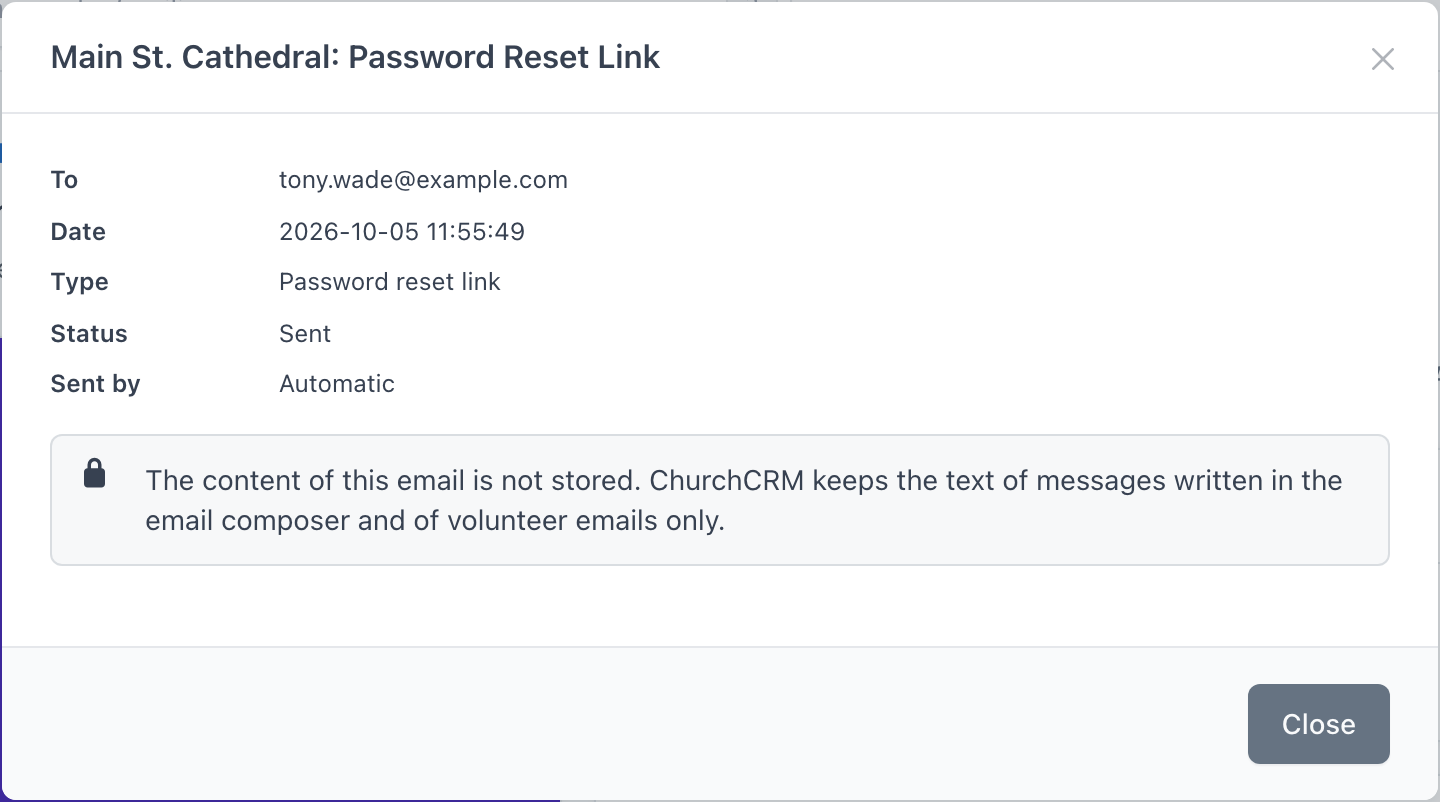
ChurchCRM keeps the full content of messages written in the composer and of volunteer emails. For every other email it stores the subject, date, and status only. Opening one shows a note instead of the message: The content of this email is not stored. ChurchCRM keeps the text of messages written in the email composer and of volunteer emails only.
Show all
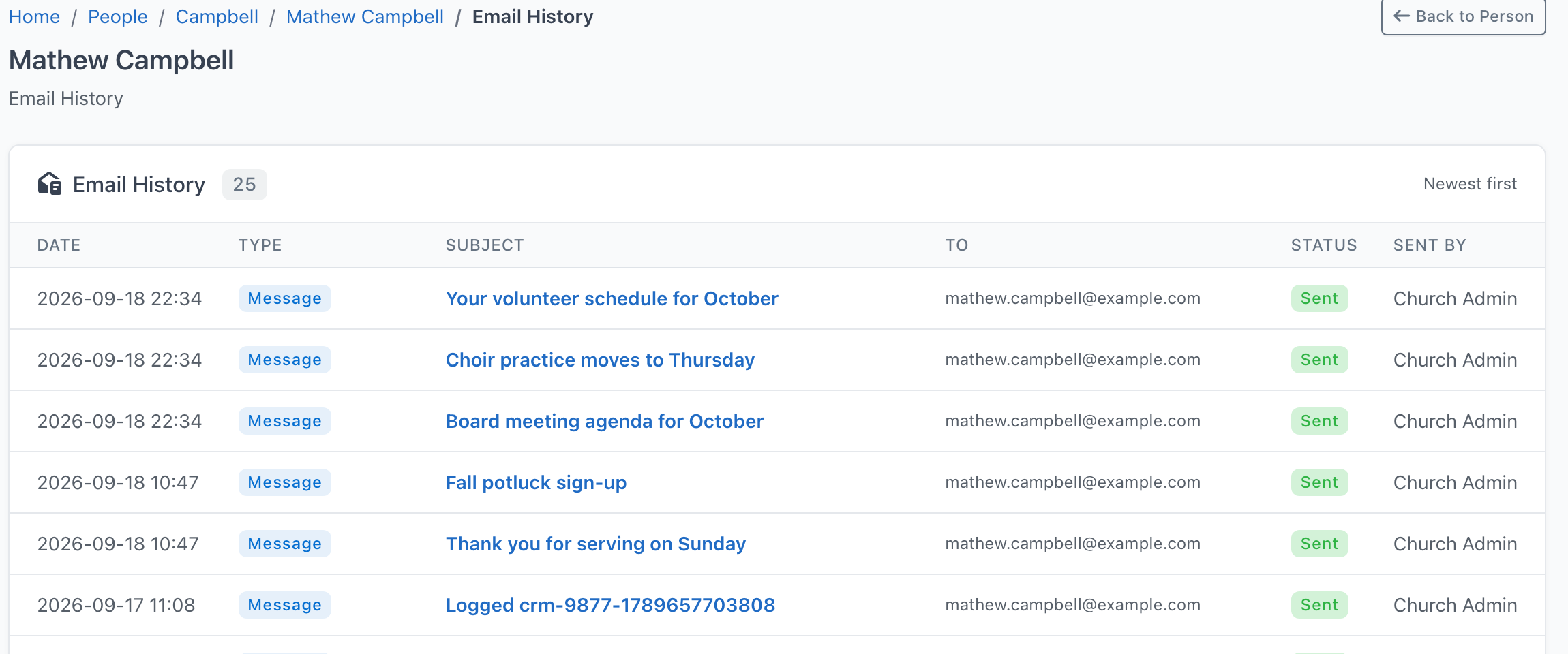
Click Show all at the bottom of the card to open the person's complete email history, newest first, 25 per page. Back to Person returns to the Person View.
Email history is kept indefinitely; nothing is deleted automatically. Families have no card of their own: history is recorded per person, so open the family member you are interested in. An email sent to the family's own address (for example from the Family View) is recorded against the family, not a person, so it appears on nobody's card. Administrators see the most recent emails to everyone, family addresses included, on the Email dashboard.
Attendance
Open the person and click the Attendance tab. It loads the first time you open it.
Three cards sit at the top:
| Card | What it shows |
|---|---|
| Total Events | Events this person has checked in to |
| Last Attendance | Date of the most recent check-in, or Never |
| Best Streak | Longest run for one event type (the type name is the tooltip). The count is shown as a number of events. |
The table columns are Event, Type, Date, Check-in, and Check-out.
Filters above the table are Event Type, From, and To. Clear resets them. There is no Apply Filter button.
Volunteer tab
With Volunteer Management (v2) switched on, the Person View has a Volunteer tab in two columns: Qualified for (each position, with a link to its ministry) and Serving next (each upcoming date with an Accepted or Awaiting reply badge, linking to the occurrence's staffing view). A person with no qualification and no upcoming date shows "Not volunteering yet". The tab is read-only; qualifications are ticked on the ministry's Volunteers tab and assignments are made on the staffing view.
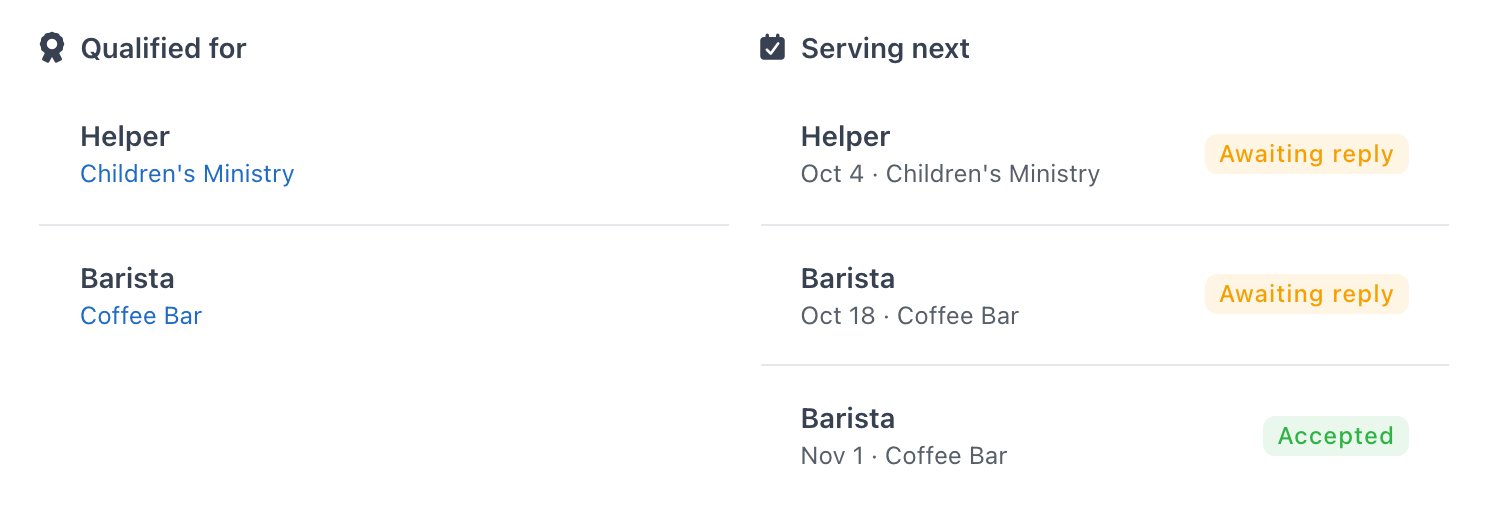
When the volunteer experience is Both, the legacy opportunities list appears on its own tab, Volunteer (Legacy), just before the Volunteer tab, so it is always obvious which one you are looking at.
Photo Management
When a person record is deleted, any associated profile photo is automatically cleaned up from the server.
Upload a photo from the person view, not the Person Editor. Click the photo (the tooltip is Click to upload photo) and choose the file. You need permission to edit records.
Photo Directory
People → Photo Directory shows a grid of active people so you can match a face to a name. People in inactive classifications are not listed.
Each card shows the photo, or initials when there is no photo, plus the classification. Not Classified means no classification is set. Click the photo or the name to open the person record.
The three buttons under the name are:
- Call — dials the cell number, or the home number if there is no cell number. It is disabled with No phone number on file when neither is set.
- Send text message — opens a text to the cell number. It is disabled with No cell phone on file when there is no cell number.
- Email — opens a mail message to the address on the person. It is disabled with No email address on file when there is no address.
Filter the grid with All Classifications, a single classification, or Unassigned. Turn on Photos only to hide people who have no photo. Choose how many cards appear with the page list, or All. Reset clears the filters. If nothing matches, the page says No people found and offers Reset Filters.
Upload size and resizing
- Pick any JPEG or PNG up to 50 MB, including a full-size phone photo. Your browser shrinks it to the stored size (600x600) and never enlarges it.
- The webcam option is available for person and family photos.
- HEIC/HEIF photos from an iPhone are converted to JPEG in your browser when you pick them. If the conversion fails, export the photo as JPEG and try again.
- API callers that skip the browser are limited to 16 megapixels of source image.
Why is some information on the Person View shown in red text?
Red text indicates information inherited from the associated Family record. People assigned to the same family share common information — such as address, phone number, and email address. This information only needs to be entered once on the Family record; all members of that family will inherit it unless the individual Person record has its own value.
For example, the Smith family has four members: John, Mary, Billy, and Sally. None of the four Person records have an address, but the Smith Family record does. When Sally's Person View is displayed, the system shows the family address in red to indicate it is inherited. If Sally moves to a college dorm and her dorm address is added to her Person record, that address will appear in black, indicating it is specific to her.
This makes it easy to update shared information in one place. For a family of ten, you only need to change the address once on the Family record instead of updating ten separate Person records.
How do I add a new person?
There are two ways to add a new person:
Go to People → Add New Person, complete the form, then click Save or Save and Add. Save and Add saves the record and opens a blank form for the next person.
To add a new family and several people at the same time, use the Family Editor instead.
What is a Classification?
A classification defines a person's role within the church. Common Classifications include Member, Guest, Regular Attender, and Non-Attender.
How do I enter a person's age?
You don't enter an age. ChurchCRM calculates it from the birth date. A year by itself is not enough: saving a birth year without a month and a day shows Invalid Birth Date: Missing birth month and day. Enter the month and the day as well. If only the month or only the day is filled in, the message is Invalid Birth Date: Missing birth month or day.
People Dashboard
People → Dashboard opens the People Dashboard.
Count cards link to families, people, Sunday School (when that menu is on), and groups. People by Classification lists each classification with its share and count. The same page also shows Family Roles, Gender Demographics, Age Distribution, and report links for People Directory and Letters & Mailing Labels.
Quick Actions includes Verify People (for users with Edit Records) and New Self-Registrations. When email is available, Email All is there too.
Administrators open People Settings on this dashboard:
- Self Registration — Allow visitors to self-register as new families.
- Hide Deceased from Directory — Hide deceased members from the printed directory and CSV exports.
How do I delete a person?
Leaving inactive records in the database is often preferable for historical record-keeping, but if deletion is necessary:
- Find the person and open their Person View.
- Select "Delete this Record".
If this link does not appear, you do not have permission to delete records.
- Confirm the deletion.
What are Custom Person Fields?
Custom Person Fields let you add information to person records beyond what ChurchCRM tracks by default. Examples include a mentor relationship, a confirmation date, a T-shirt size, or an emergency contact. See Custom Fields for instructions.
Common custom fields include:
- Nickname / Preferred Name - Track what members like to be called
- Baptism or Confirmation Date - Record important spiritual milestones
- T-Shirt Size - Useful for event planning
- Emergency Contact - Important for youth ministry and events
- Spiritual Gifts - Track members' gifts for ministry placement
How do I use Custom Person Fields?
See the Custom Fields help topic for step-by-step instructions on creating and managing custom fields, including a detailed guide for adding a Nickname field.
How do I put a person in the Cart?
See the Cart help topic.
How do I assign a person to a group?
See the Groups help topic.
How do I assign a property to a person?
See the Properties help topic.
How do I add a note to a person?
See the Notes help topic.
How do I track finances for a person?
See the Finances help topic.
Can't find what you need? Ask in Discord, or open an issue on the ChurchCRM repository.