Email from ChurchCRM
ChurchCRM provides built-in tools to email individuals, families, groups, and cart selections directly from the app, plus optional Mailchimp integration for newsletters.
Prerequisites
To send email from ChurchCRM itself, your system administrator must configure an outgoing mail server and turn on email sending under Communication → Email → Email Settings. See Email Setup for the steps. Until then, the composer still helps you reach people through your own mail program (see Fallbacks).
You also need the Email permission on your user account. Administrators always have it. For other users, an administrator edits the user under Admin → System Users and, in the User Config table, sets Permission to True on the bEmailMailto row. Ask an administrator if the paper-plane button described below does not appear for you.
Sending email from ChurchCRM
ChurchCRM sends email itself when email sending is enabled. You write the message in the composer, click Send Email, and ChurchCRM hands the church's mail server a separate message for each recipient, sent from the church's email address. Nothing is handed off to a mail program on your computer.
Sending to one person or family
A paper-plane button appears next to each email address on:
- the Person View (the person's own address, and the address of each other member in the family list),
- the Family View (the family address and each family member),
- the Person Listing (People → Person Listing),
- the Photo Directory, where it is the envelope button on each person's card.
Click it to open the composer with that one recipient. The email address next to the button is still an ordinary link that opens your own mail program, for anyone who prefers that.
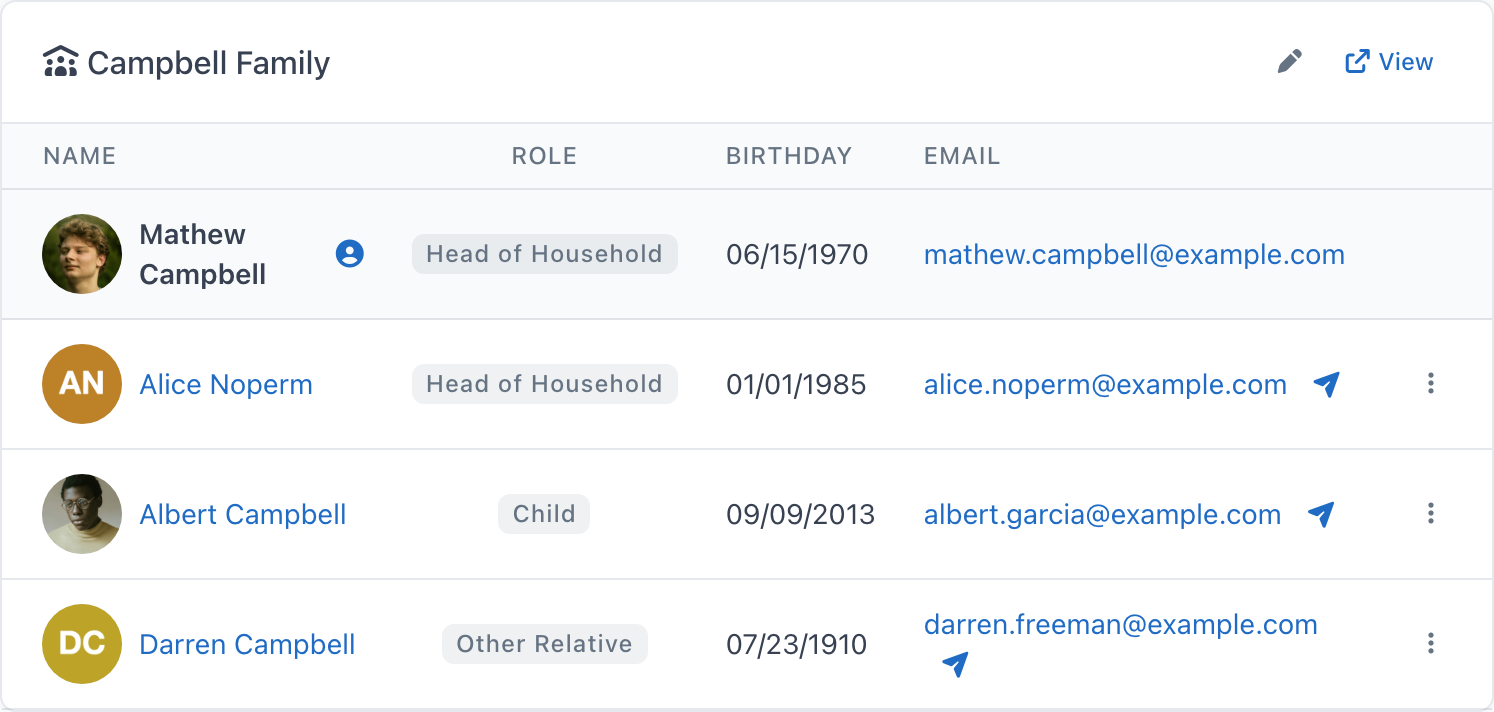
On the Person View, the family card (for example Campbell Family) also carries the button on every other family member's row, so you can email a relative without opening their record. The person's own row has none, because their address under Contact & Personal Info already has one.
Sending to a list
| Where | How to reach it |
|---|---|
| Everyone | People dashboard → Email All |
| Group members | Open a group → Email |
| Sunday School class | Open a class → Email (teachers, students, and parents also have their own buttons) |
| Cart | Cart → Email |
| People who missed an event | Open an event that has ended → Did Not Attend card → Email All, or the button next to one person's address (the card appears when groups are linked to the event) |
The composer opens with the list already loaded. The recipient count badge shows how many people will be emailed; expand the list to see who they are, grouped by role. When the list has more than one role (for example Member and Guest, or a class's teachers and parents), Roles to include shows a checkbox for each; untick a role to leave those people out.
Send Email reaches up to 500 people at a time. ChurchCRM refuses a larger send with a message saying so; narrow the list (untick roles, or use a group or the cart), or use Mailchimp for newsletters.
Writing the message
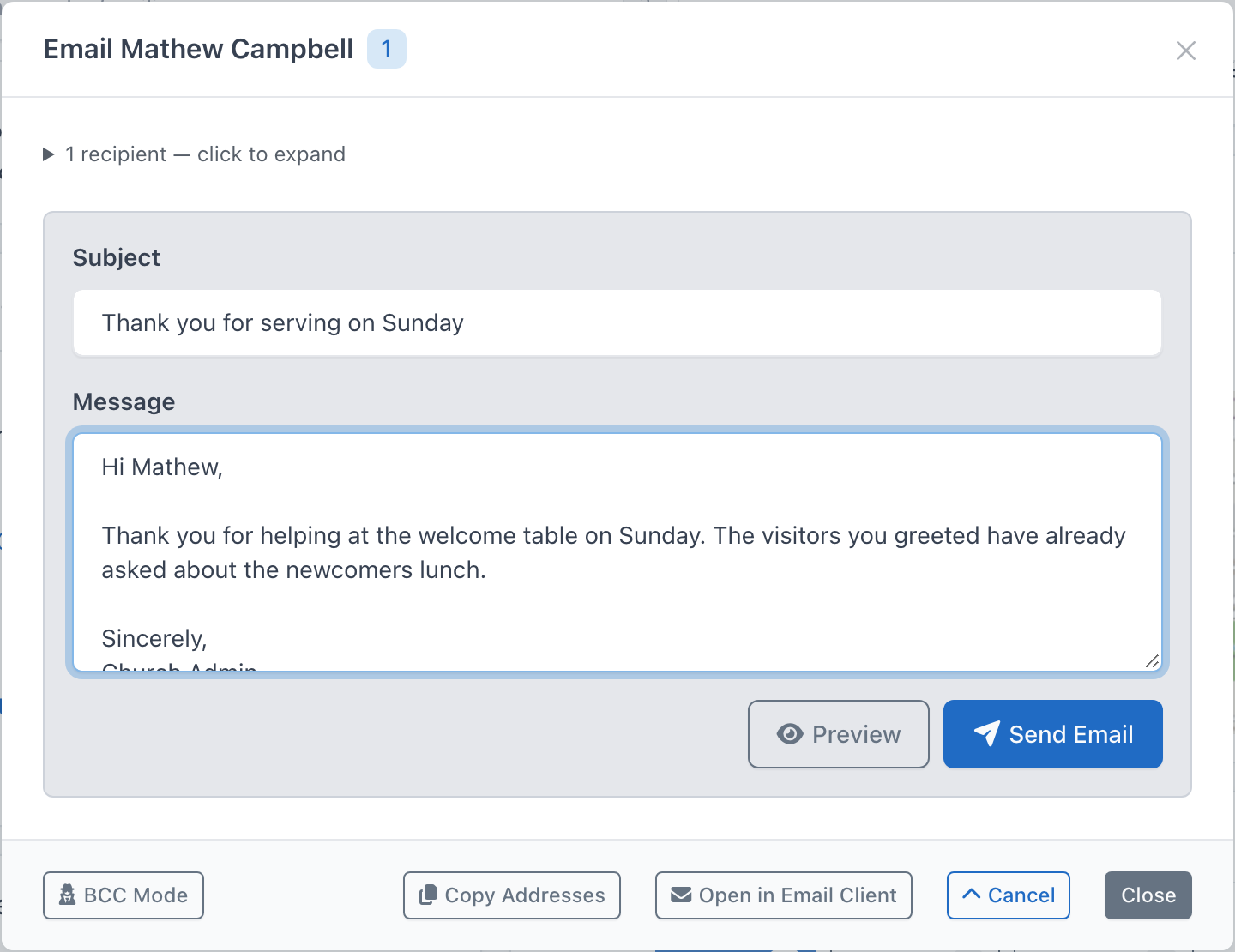
- Click Compose Message at the bottom of the composer. The form opens, and the button changes to Cancel, which closes the form and discards what you typed.
- Enter a Subject.
- Write the Message. The box starts empty so you can write your own greeting. Two lines down, the closing is already filled in for you: "Sincerely," followed by your name and the church name. Edit or delete it as you like.
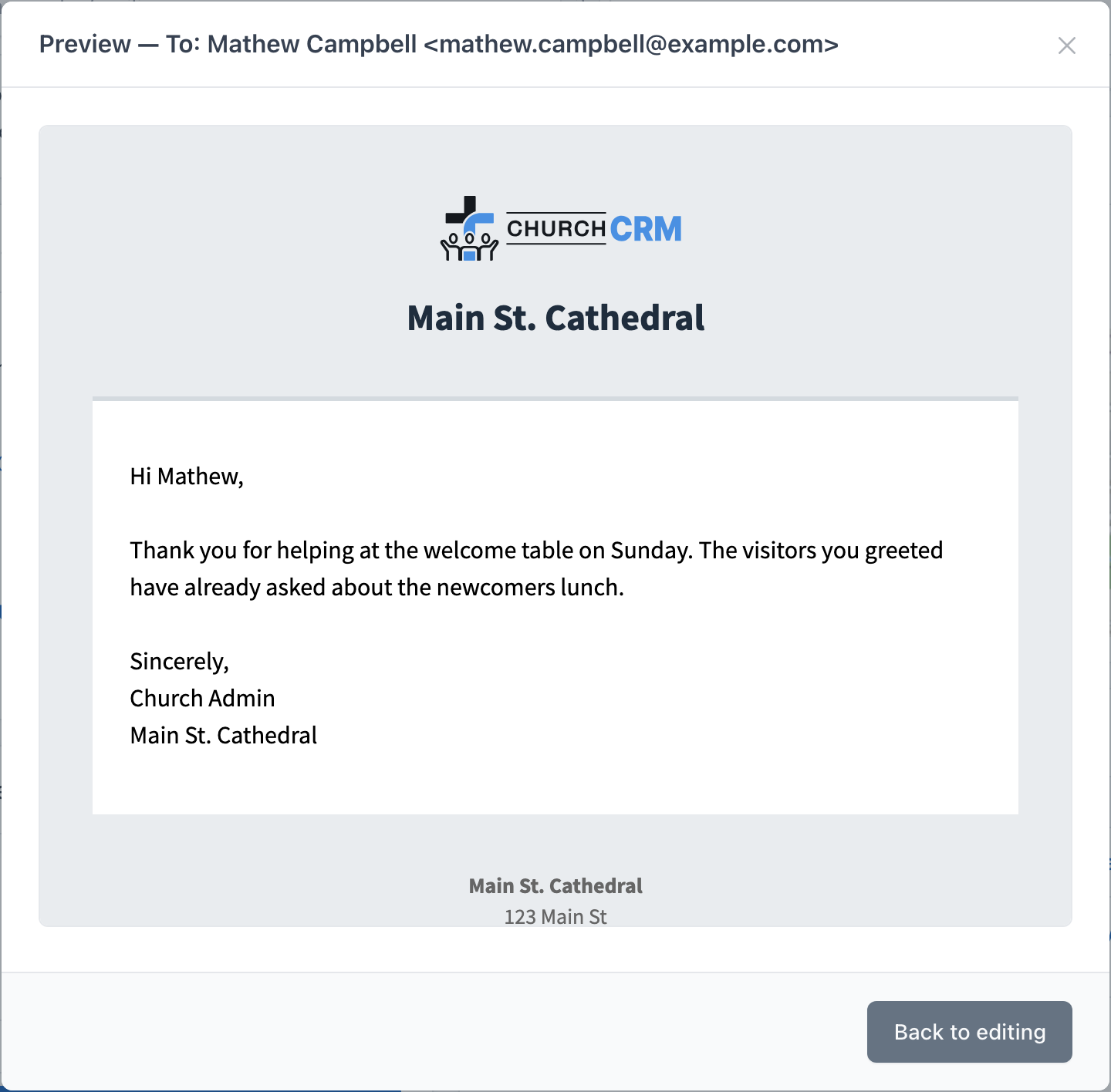
- Click Preview to see the message exactly as the first recipient will receive it, with the church logo and header. The preview's title names that recipient and how many others will get the message. Click Back to editing to return.
- Click Send Email. When the message has gone, the button reads Sent and the form is locked, so the same message cannot be sent twice.
Each recipient gets a separate message addressed to them alone, so nobody sees anyone else's address. The message is sent from the church's email address.
The email contains your message as you typed it, with the church logo and name above it and the church's contact block below it (name, address, phone, email, and website, exactly as shown in the Display Preview on Admin → Church Information). ChurchCRM does not add a "Dear …" line or a closing of its own, and there is no "you received this email because…" or unsubscribe text: newsletters go through Mailchimp, which adds its own.
Who was not emailed
After sending, a banner in the composer confirms how many people were emailed. If anyone was left out, the banner lists them under Not sent with the reason:
| Reason | Meaning |
|---|---|
| no email address | Neither the person nor their family has an email address on record. |
| marked do not email | The person has the property your administrator chose as Do Not Email Property in the email settings. |
| deceased | The person is marked as deceased. |
| inactive family | The family record is deactivated. |
| same address as another recipient | Two people share one address; the message went to that address once. |
| record not found | The person or family was deleted after the list was loaded. |
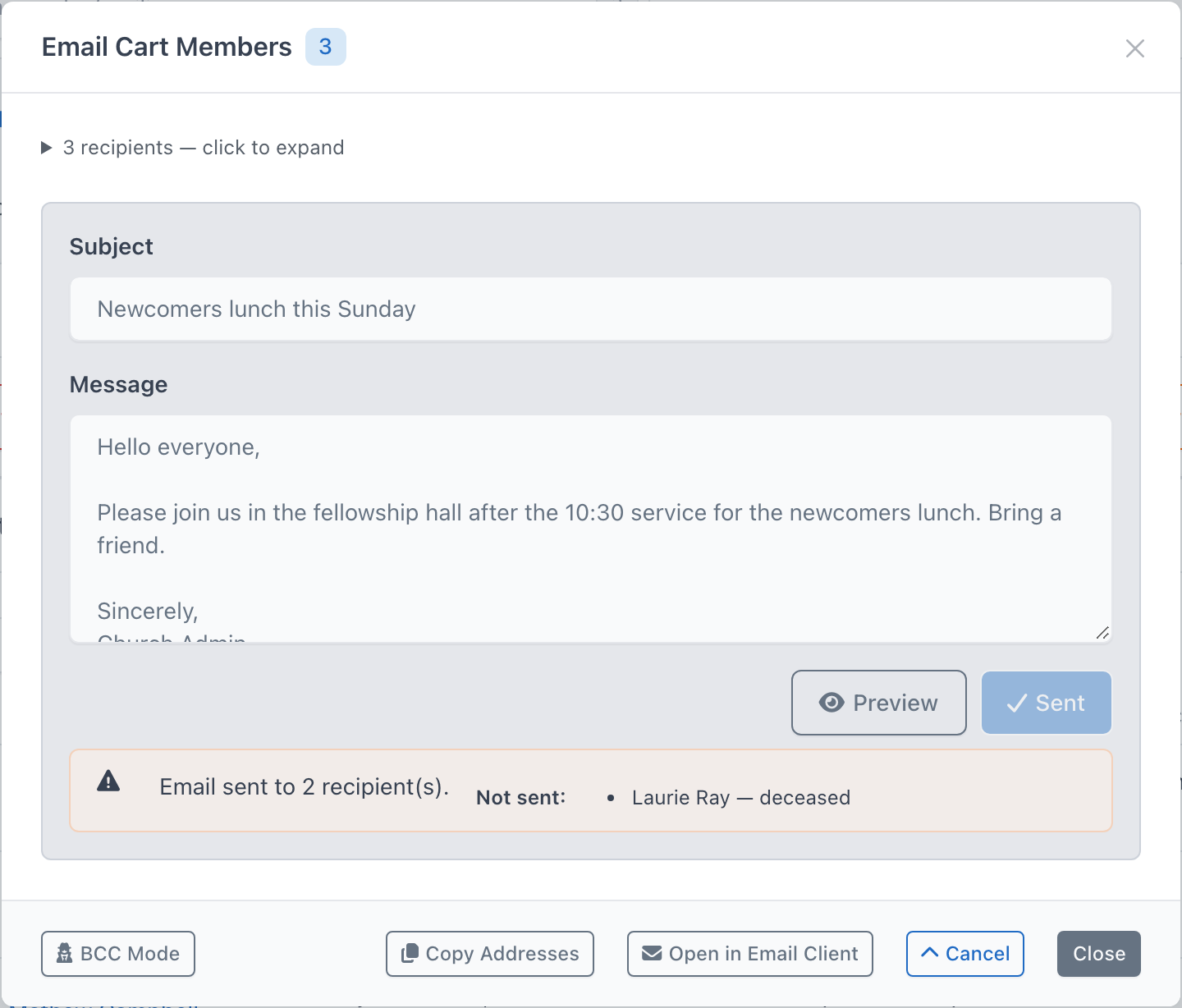
A skipped person is not an error: ChurchCRM checked the record and decided not to send. A person counted as sent had their message handed to the mail server without an error; ChurchCRM cannot see whether it then reached their mailbox. If nobody could be emailed, the banner is red and says so (for example No email was sent.), with the same Not sent list, and Send Email stays available so you can correct the records and try again. If the mail server refused a message, the banner shows that person's name with the error the server returned; ask your administrator to check the email settings.
Fallbacks: Copy Addresses and Open in Email Client
The composer keeps the two older options at the bottom of the window:
- Copy Addresses — copies every address to your clipboard so you can paste it into any mail program.
- Open in Email Client — opens your default mail program with the recipients filled in. Available for lists of 50 addresses or fewer; for larger lists use Copy Addresses instead.
- BCC Mode — makes Open in Email Client put the addresses in BCC: instead of To:. It has no effect on Copy Addresses or on Send Email, which always sends one message per person.
Use these when email sending is not set up, or when you would rather write the message in your own mail program.
When you email a list (cart, group, class, everyone) and an administrator has set Copy Church Email under Communication → Email → Email Settings, the composer shows Also send to church address (…), ticked, so the office keeps a copy. Untick it to leave the office out. This applies to Copy Addresses and Open in Email Client only. Send Email mails the people in the list and nobody else: when the list holds an address with no person record behind it, such as the church's own, the compose form says it is not included.
Permissions
The paper-plane buttons and the Compose Message button (and with it Send Email) appear only for users who have the Email permission, and only when an administrator has enabled email sending. Everyone else still sees email addresses as ordinary links that open their own mail program.
Without the Email permission, the list buttons (Email All on the People dashboard, and Email on groups, classes, and the cart) and the Communication menu are hidden too. With the permission but without email sending, the list buttons still open the composer, offering Copy Addresses and Open in Email Client only.
Email dashboard
Communication → Email opens the Email dashboard at /v2/email/dashboard. SMTP and the switch that turns email on live here, not under System Settings → Email Settings.
Admins use Email Settings on that page:
- Enable Email
- SMTP fields: SMTP Host, SMTP Timeout, Encryption, Auto TLS, SMTP Authentication, SMTP Username, and SMTP Password
Until email is enabled, the page says Email is Disabled and tells you to enable it, then configure SMTP. The status line is SMTP Configured or SMTP Not Configured.
Email Tools on the same page:
- Duplicates — addresses that are used more than once (
/v2/email/duplicate) - People Without Emails — people with no personal or work email (
/v2/email/missing)
Password resets and similar system messages use that SMTP setup.
Email history and the Email dashboard
ChurchCRM keeps a record of every email it sends, including messages written in the composer, birthday greetings, family verification links, account emails (new account, password reset, lock and unlock, deletion), notifications, volunteer emails, and the SMTP test. Each person's history is shown on their Person View; see Email History.
Recent Sends (administrators)
Administrators also see a Recent Sends panel at the bottom of the Email dashboard (Communication → Email in the left navigation). It lists the 20 most recent emails ChurchCRM sent to anyone, newest first, with the date, type, subject, recipient address, status, and who sent it (a user, or Automatic). The badge next to the title is the total number of emails on record; a red failed badge next to it counts the emails the mail server refused.
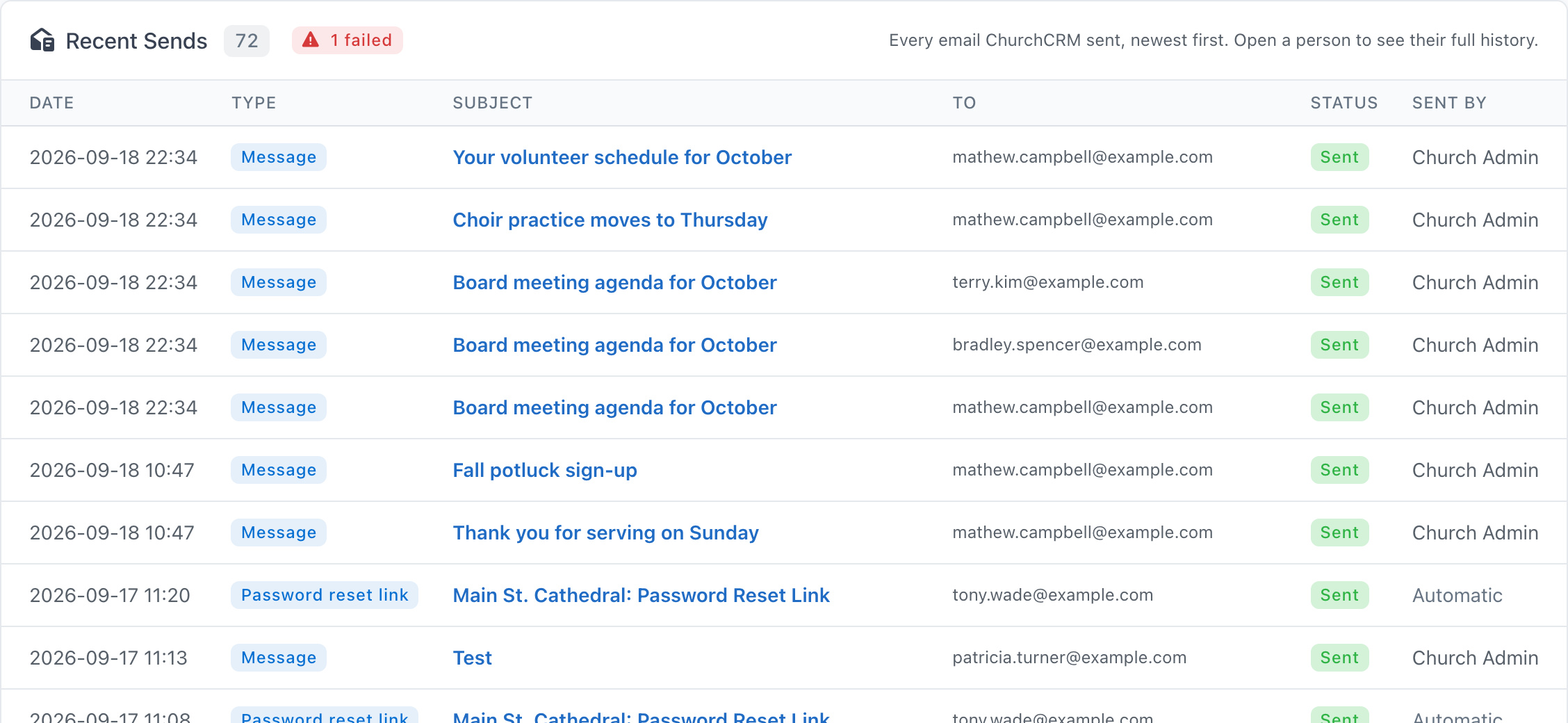
This is the first place to look when somebody says "nobody got the email":
- If the message is listed as Sent, ChurchCRM handed it to the mail server; ask the recipient to check their spam folder.
- If it is Failed, hover over the badge to read the mail server's error, then check the email settings.
- If it is Skipped, email sending was turned off, or no mail server was set up, when the message was sent; fix the email settings and send again.
- If it is not in the panel, it may be older than the latest 20 the panel shows: open the person's history. An email sent to a family's own address is recorded against the family, not a person, so it is on no person's history, and once it drops out of the latest 20, ChurchCRM no longer shows it.
- If an email to a person is in neither the panel nor their history, ChurchCRM never tried to send it. A person the composer left out (no email address, do not email, deceased, or the same address as another recipient) was named under Not sent in the composer's result banner and leaves no entry in the history.
Click a subject to open the email, or open a person to see their full history. Messages written in the composer and volunteer emails open as they were sent; for every other email ChurchCRM keeps only the subject, date, and status, so it shows a note instead of the message (see Opening an email). The panel is visible to administrators only; other users see the history of the people they can open.
Mailchimp
Mailchimp is a plugin, not a system-settings key. There is no sMailChimpApiKey field under System Settings.
- Create a Mailchimp account and an API key.
- In ChurchCRM, go to Admin → Plugins and open the mailchimp plugin.
- Save the API key in that plugin's settings.
The Email dashboard shows Mailchimp Connected or Mailchimp Not Configured, with Plugin Settings when you need to finish the connection.
Best Practices
- Always get consent before adding someone to an email list.
- Use the Mailchimp plugin for newsletters and large announcements.
- Use the in-app composer for ad-hoc messages to a person, a family, a group, or the cart.
- Keep your Classifications updated to target the right audiences.
Can't find what you need? Ask in Discord, or open an issue on the ChurchCRM repository.