Reports and Queries
ChurchCRM provides built-in reports and database queries to help you extract and analyze your church data.
Overview
| Type | Purpose |
|---|---|
| Reports | Pre-formatted documents ready for printing (directories, labels, letters) |
| People Reports | Filtered lists of people you can send to the Cart, print as labels, or download |
Finance letters and giving reports are under Deposit Reports.
Church Directory Report
Reports → People Reports → People Directory opens the Directory reports form, which builds a printable PDF directory of your families. The Reports card on the People dashboard links to the same form. Choose which families to include (Exclude Inactive Families, classifications, group membership), which family roles count as head of household, spouse and child, and which details to print under Information to Include. Then pick the page layout, columns, paper size and font size, optionally add a title page and disclaimer, and click Create Directory.
Who is included
- Select at least one classification under Select classifications to include. The form will not run with none selected. The classifications ticked In Directory under People → Admin → Person Classifications are selected when the form opens.
- People who signed up through the public registration form are left out until they are approved under People → Self Registrations.
- For a directory of only the people in the Cart, click Directory in the Cart Functions bar. That form has no classification or group filters: the Cart decides who is printed.
Page Layout
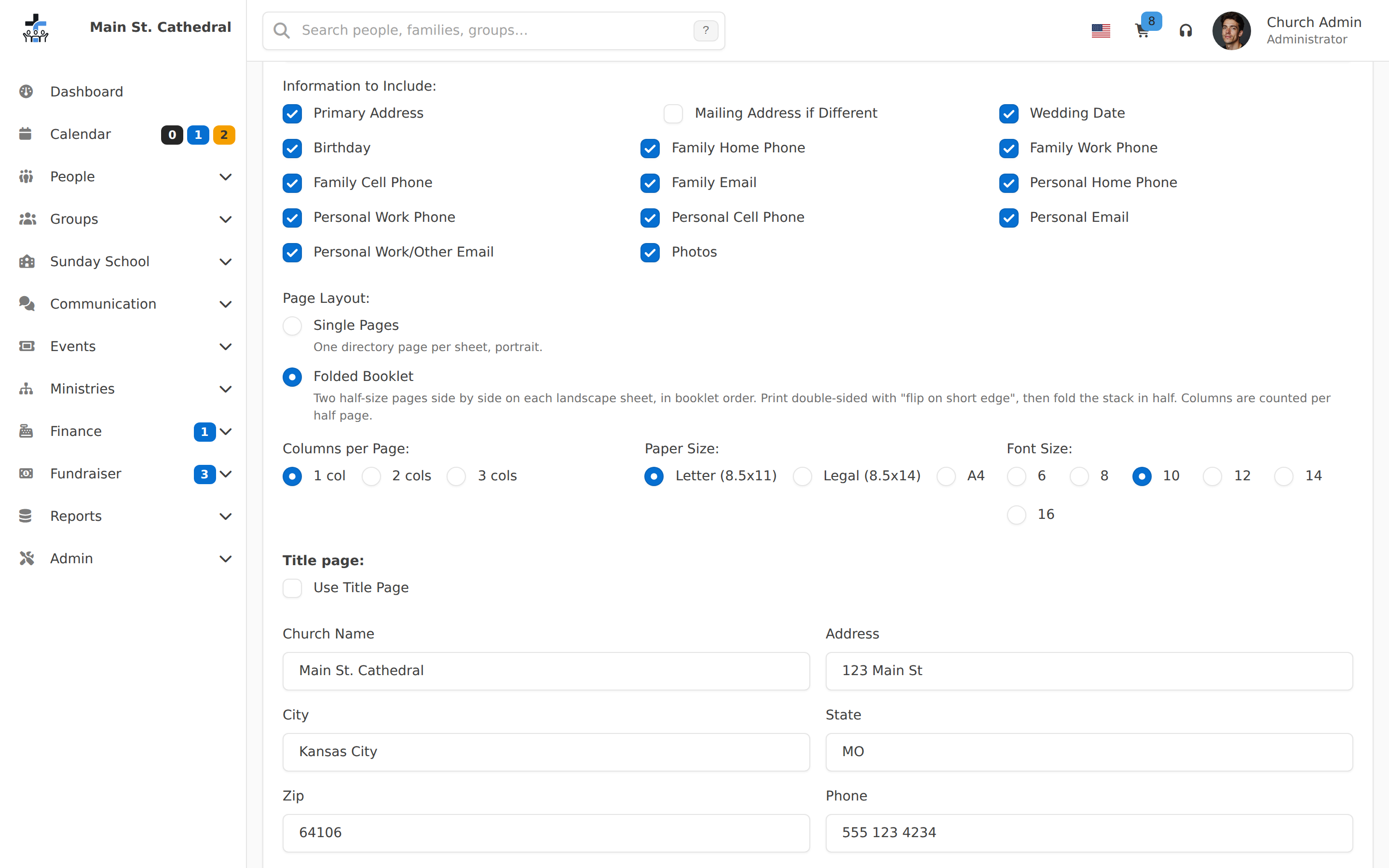
| Layout | What you get |
|---|---|
| Single Pages (default) | One portrait directory page per sheet. |
| Folded Booklet | Two half-size pages side by side on each landscape sheet, arranged in booklet order and padded to a multiple of four pages, so the printed stack folds into a booklet. Letter paper gives 5.5 × 8.5 in pages, A4 gives A5 pages, Legal gives 7 × 8.5 in pages. |
Columns per Page (previously Number of Columns) is counted per directory page. In the booklet layout a page is one half of the sheet, so 2 cols shows four columns across an open booklet. For a small booklet, 1 col is often the easiest to read.
Printing a folded booklet
- Choose Folded Booklet, set Paper Size to the paper in your printer, and click Create Directory.
- Print the PDF on both sides of the paper. In the printer's two-sided (duplex) options choose flip on short edge (some drivers call it short-edge binding). Most drivers default to long edge, which prints the backs upside down.
- Fold the stack of sheets in half down the middle and staple on the fold.
If Use Title Page is ticked, the title page becomes the front cover of the booklet.
Print the first two sheets as a test before running the whole directory. With the short-edge setting right, the pages on the back of each sheet are the right way up once the sheet is folded.
Mailing labels
One way to print mailing labels is the Cart: put the people in the Cart, then click Labels in the Cart Functions bar. The Generate Labels dialog offers one label per person or per family, bulk-mail presort, a "To the parents of" prefix, Avery and tractor-feed label types, font and size, a start row and column, and PDF or CSV output.
Labels for a filtered mailing (for example birthdays or wedding anniversaries in a date range): go to Admin → Export → Open CSV Export, set the filters, choose Add Individuals to Cart, then open the cart and click Labels.
Which address is printed
Mailed letters and the labels listed below go to the family's mailing address: the family's second address when it is ticked as This is the mailing address, and the primary address otherwise (see Second Address and Mailing Address). Families with no second address, or whose second address is not ticked, get their primary address.
- Cart labels, and Print Labels on a People Report: each label uses the person's own address when one has been entered on their record, otherwise the family's mailing address. A label never mixes a person's street with the family's city.
- Newsletter labels and Confirm data labels on the Letters and Mailing Labels page print the mailing address. Labels are ordered by the ZIP code that is actually printed, for presorting.
- Mailed letters print the mailing address in the address block: confirmation letters, tax statements (the letter and the remittance slip), reminder letters, zero-giver letters and fundraiser statements. Confirmation letters and tax statements sent by email use the same address. The confirmation data sheet also lists Mailing Address when it differs from the primary address, so families can check what is on record.
- People Directory: under Information to Include, Primary Address (on by default) prints the physical address. Tick Mailing Address if Different (off by default) to print a family's flagged mailing address beneath it, under a "Mailing Address:" label, when it differs from the primary address. That option can only be ticked while Primary Address is ticked.
People Directory and Letters & Mailing Labels are on the Reports card of People → Dashboard. Reports → People Reports also links to People Directory. Letters & Mailing Labels appears there when the login has Manage Properties and Classifications, the same permission as the Letters and Mailing Labels page. Envelopes carry no address.
People Reports print the same labels without using the Cart. See Print Labels on People Reports.
People Reports
Open Reports → People Reports. Every staff login can open this page. A login set to Edit Self only cannot. Missing People is listed only when you can open Events. Pick a report, set the filters, and click Run Report.
Classification is on every report. It is a multi-select list read from Admin → Classification Manager, so custom classifications appear automatically. It also offers Unassigned for people with no classification. Leave it empty (placeholder All classifications) to include everyone.
Month is a dropdown of month names, preselected to next month in the church time zone. The month reports run as soon as they open. A report that needs a Property, Volunteer Opportunity, or Events choice shows a hint until you pick one.
The results header has Add All to Cart and Download CSV. Print Labels is there when the login has Manage Properties and Classifications, and it is disabled when the report has no rows. Delete on a result row needs Delete Records.
People by Grade
People by Grade lists everyone from one school grade through another, sorted by grade and then by name. Choose From Grade, and Through Grade for a range. Leave Through Grade empty for a single grade. The Classification filter works as on the other reports. Deceased people are not listed.
Add All to Cart followed by Empty Cart to Group fills a Sunday School class. See Filling a class by grade.
Print Labels on People Reports
Print Labels opens the same Generate Labels dialog as the Cart. It prints the rows on the page, with the filters currently applied. The Cart is not used, and the people in the Cart are not changed.
The dialog says: "Mailing labels for the people in this report. A person with no address of their own is addressed at their family address." The options are the Cart's: Label Type, Font, Font Size, Bulk Mail Presort, Quiet Presort, To the parents of, Ignore Incomplete Addresses, Start Row, Start Column, and PDF or CSV. Click Generate Labels. Label type, font, size, presort, "To the parents of", and the grouping choice (on reports that offer one) are remembered the next time you open the dialog, including from the Cart. Start Row, Start Column, and File Type start over each time. Ignore Incomplete Addresses starts ticked.
Start Row and Start Column begin printing partway down the first sheet, so you can finish a partly used sheet of labels. Both start at 1, which is the top-left label.
How a report addresses its labels:
| Report | What Print Labels does |
|---|---|
| Birthdays & Anniversaries | The dialog states: "Birthdays are addressed to the person and anniversaries to the couple." There is no grouping choice. A birthday row is one label in that person's name. An anniversary row is one label for the couple (for example "Franklin & Julie Beck"), not one label per spouse. A person who has both a birthday and an anniversary in that month gets both labels, on the same sheets. |
| Wedding Anniversaries | The dialog states: "One label for each couple." There is no grouping choice. |
| Every other People Report | Choose All Individuals (one label per person) or Grouped by Family (one label per family). |
The result table for Wedding Anniversaries and for anniversary rows on Birthdays & Anniversaries still lists each spouse. Print Labels collapses those anniversary rows to one household label. That label names both spouses even when the classification filter matched only one of them. The filter still decides which couples are in the report.
Monthly birthday and anniversary cards
- Open Reports → People Reports → Birthdays & Anniversaries.
- Check Month. It defaults to next month. Leave Classification empty for everyone, or pick the classifications you mail.
- Click Run Report.
- Click Print Labels, set Start Row and Start Column if the first sheet is already partly used, and click Generate Labels.
Birthday cards and anniversary cards for that month come out on the same label sheets.
People Report Details
Every report has the Classification filter. The table lists only the additional filters.
| Report | Returns | Extra filters |
|---|---|---|
| Person by Property | People assigned the chosen property | Property |
| Birthdays | People whose birthday falls in the month | Month |
| Membership Anniversaries | People whose membership date falls in the month. It is not limited to Members; pick the classifications you want | Month |
| Volunteers | Volunteers for one opportunity | Volunteer Opportunity |
| Volunteers for Two Opportunities | People who volunteer for both chosen opportunities | First and Second Volunteer Opportunity |
| Recent Friends | Friends who signed up in the last N months | Months (1–24) |
| Missing People | People who did not attend the chosen events | Events (multi-select) |
| Wedding Anniversaries | People whose family wedding date falls in the month | Month |
| Birthdays & Anniversaries | Birthdays and wedding anniversaries for the month in one list, with a Type column | Month |
Wedding Anniversaries and Birthdays & Anniversaries list one anniversary row per spouse. Print Labels prints one label per couple. See Print Labels on People Reports. Families with no wedding date are not included.
Can't find what you need? Ask in Discord, or open an issue on the ChurchCRM repository.