System Settings & Configuration
ChurchCRM's settings are spread across several pages. This page is where to look for each one.
- Church Information — Admin → Church Information
- People Settings — People → Admin → People Settings
- Map Settings — People → Admin → People Settings → Map Settings
- Localization & Formats — Admin → Localization & Formats (time zone is here)
- Email — Communication → Email → Email Settings
- Passwords, lockout, session, and 2FA — Admin → System Users → Settings → Quick Settings
- System Settings tabs — Financial Settings, Quick Search, Confession, Scheduled Tasks, Report Settings
There is no Edit General Settings page, and System Settings has no Advanced, Finance, Search, Security, or Integration tab.
Church Information
Location: Admin → Church Information
| Setting | Description | Required |
|---|---|---|
| Church name | Shown in headers, emails, and PDF reports | Yes |
| Address | Street address for mail and the map | |
| City, State, ZIP | Church location | |
| Country | Church country | |
| Phone | Shown on contact pages | |
| Church contact email. Outbound mail uses this address as the From address, with the church name | ||
| Website | Church website | |
| Church Logo | Uploaded on the Church Logo card. Shown in the sidebar, on the login and other sign-in pages, and in emails. See Church Logo. The sChurchLogoURL setting is only a fallback for emails when no logo has been uploaded. The PDF report letterhead is a separate image, see FAQs. | |
| Social media links | Optional https:// links to the church's X, YouTube, Facebook, and Instagram accounts, shown in the Member Portal footer. See Social Media |
Address Defaults on the same page sets the city, state, ZIP, and country filled in for a new family. The same four defaults are also on People → Admin → People Settings → New Members & Greeting.
Church name is required. First-time setup sends you here to fill it in.
People Settings
Location: People → Admin → People Settings (admin-only). The same People Settings button is in the header of the People Dashboard and of every People admin page.
The page opens with shortcuts to the People lists and editors (Person Classifications, Person Properties, Person Custom Fields, Family Roles, Family Properties, Family Custom Fields, Volunteer Opportunities), followed by three groups of settings.
There is no Save button. Each setting saves as soon as you change it and a "Settings saved successfully" message confirms it. Text boxes save when you click out of them.
People
| Setting | Description | Default |
|---|---|---|
| Person name display style | How names are written (for example FirstName MiddleName LastName, or LastName, Title FirstName) | FirstName MiddleName LastName |
| Person initials style | Avatar initials: one character from first and last name, or two from the first name | First + Last |
| Hide Address Without Family | Hide the address field for people who are not in a family | On |
| Hide Friend Date | Hide the Friend Date field in the Person Editor | Off |
| Hide Deceased from Directory | Leave deceased members out of printed directories and CSV exports | On |
Families
| Setting | Description | Default |
|---|---|---|
| Head of House Role | The family role that counts as head of household | Head of Household |
| Spouse Role | The family role that counts as spouse | Spouse |
| Child Role | The family role that counts as a child | Child |
| Hide Wedding Date | Hide the Wedding Date field in the Family Editor | Off |
| Hide Newsletter Subscriptions | Hide newsletter subscription management in the Family Editor | Off |
| Uppercase Zip/Postcodes | Save zip and postal codes in UPPERCASE | Off |
New Members & Greeting
| Setting | Description | Default |
|---|---|---|
| Self-Registration | Allow visitors to register their own family. When enabled, a link appears on the login page. | Off |
| Notification Recipients | The people who get an email when a new person or family is added. Search and pick them by name. | None |
| Include Details in Notifications | Add contact and demographic details to that email | Off |
| Greeter Message 1 / 2 | Up to 255 characters each, shown near the end of the notification email. Line breaks are kept. | Empty |
Settings that live on the classification list
Two settings are columns on the Person Classifications editor (People → Admin → Person Classifications), not on this page. See Classifications.
- Inactive: people in this classification are treated as inactive
- In Directory: this classification starts ticked on the Directory report
Default Location and Map Fields
| Setting | Where | Description |
|---|---|---|
| Default country, state, city, ZIP code | People → Admin → People Settings → New Members & Greeting → New Record Defaults. Also under Address Defaults on Admin → Church Information | Pre-fill the address fields on new person and family forms |
| Hide latitude/longitude | People → Admin → People Settings → Map Settings | Hide the manual geocoding fields (background geocoding still runs) |
Map Settings
Location: People → Admin → People Settings → Map Settings (administrators only)
ChurchCRM uses Leaflet and OpenStreetMap, with free geocoding services. No map API key is required.
| Setting | Description | Default |
|---|---|---|
| Default Map View | Starting zoom, from continent down to street | City |
| Hide Latitude/Longitude | Hide the latitude and longitude fields in the Family Editor. Geocoding still runs | Off |
| Hide Address Without Family | Same switch as in the People section above | On |
| Geocoding services | Keyless geocoders, tried in the order picked. Nominatim works worldwide; US Census covers United States addresses only | Nominatim |
The map is centered on the latitude and longitude saved with Church Information.
For the rest of the map, see Maps & Geocoding.
Ministry Settings
The Volunteer Management settings live on their own page, Admin → Ministry Settings, not under System Settings.
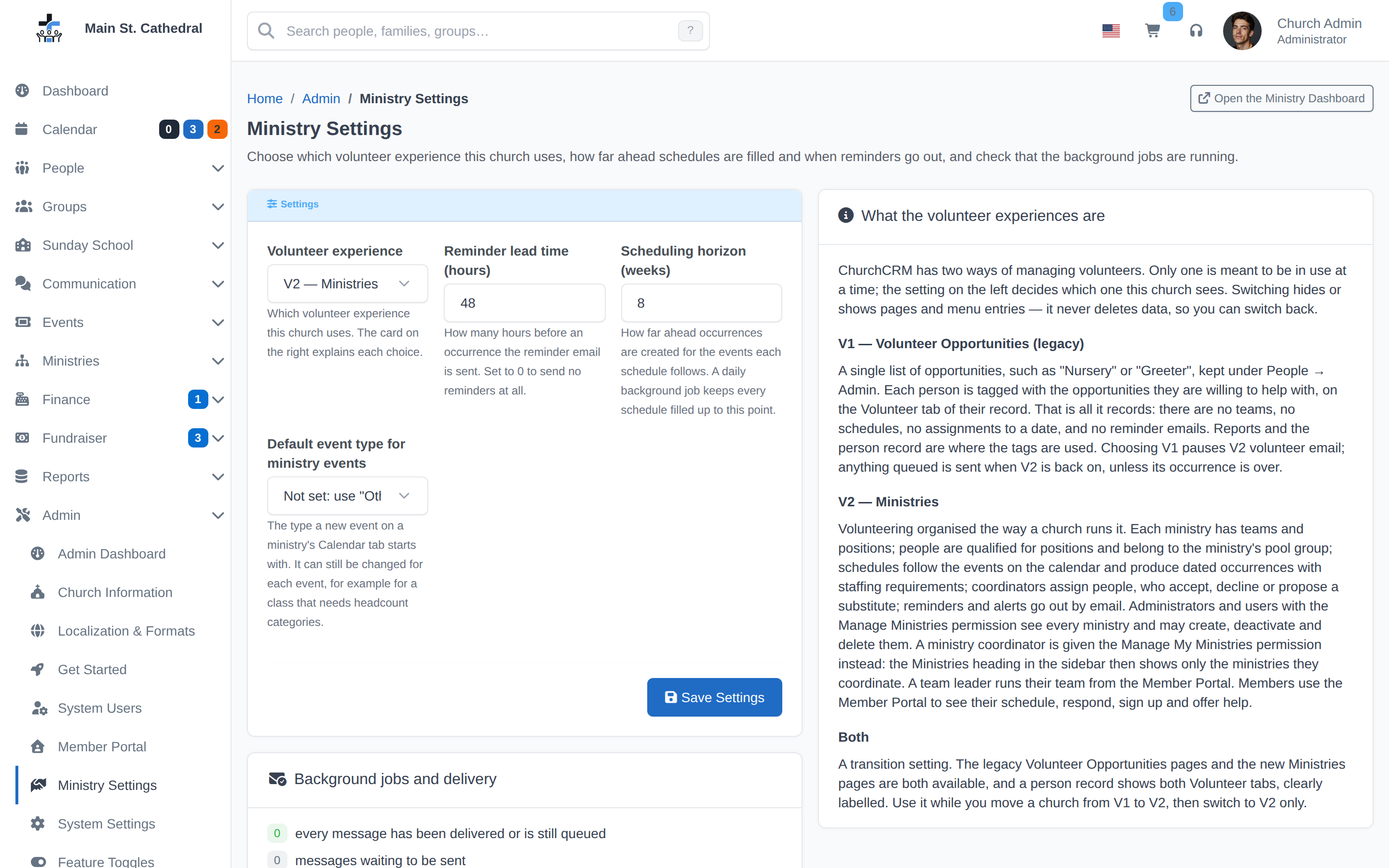
| Setting | Description |
|---|---|
| Volunteer experience | V1 — Volunteer Opportunities (legacy) (the default, today's feature), V2 — Ministries (the new Volunteer Management (v2)), or Both (transition) for running the two side by side. System-wide. Switching shows or hides pages and menu entries and never deletes data. |
| Reminder lead time (hours) | How many hours before an occurrence the volunteer reminder email is sent. Default 48, from 0 to 720; 0 sends no reminders. |
| Scheduling horizon (weeks) | How far ahead schedules make occurrences for the events they follow, for every schedule in the church. Default 8, from 1 to 52. A daily background job keeps every active schedule filled up to this point. See Schedules and occurrences. |
| Default event type for ministry events | The event type a new event on a ministry's Calendar tab starts with; it can still be changed for each event. Not set uses the type named "Other", which ChurchCRM 7.8.0 adds when it does not exist. If there is no active type named "Other", the empty choice reads None and the type is chosen for each event. |
The page also explains the three choices. Its Background jobs and delivery card shows the failed and queued volunteer messages, when background jobs last ran, when schedules were last topped up and what that made, the cron line to install, and a Run background jobs now button that also tops up the schedules. See Volunteer email and reminders.
Localization & Formats
Location: Admin → Localization & Formats
| Setting | Description |
|---|---|
| Language | Church-wide language. A person can override it under Change Settings → Localization |
| Time zone | Church time zone for events and scheduling |
| Date formats | Long date, short date, date and time, file names, and the date picker |
| Currency symbol and position | Also listed on System Settings → Financial Settings |
| Thousands and decimal separators | Also listed on Financial Settings |
| Phone number format | Home, cell, and extension masks |
| Distance | Miles or kilometers |
Email
Location: Communication → Email → Email Settings
Email is not a System Settings tab. See Email Setup.
| Setting | Description |
|---|---|
| Enable Email | Turn sending on or off |
| SMTP Host | Mail server, including the port, such as mail.example.com:587 |
| SMTP Timeout | Seconds to wait for the server |
| Encryption | None, TLS, or SSL |
| Auto TLS | Use encryption when the server offers it |
| SMTP Authentication | On when the server requires a username and password |
| SMTP Username / Password | Login for that server |
| Copy Church Email | Address added as a removable recipient when someone composes mail |
| Do Not Email Property | Person property that keeps someone off email lists |
| Default Inbox Preview Text | Fallback preview line beside the subject |
The From name is the church name, and the From address is the email on Church Information.
System Settings → Financial Settings
Location: Admin → System Settings → Financial Settings
| Setting | Description | Default |
|---|---|---|
| Enable Finance menu | Show or hide Finance | On |
| Enable Fundraiser menu | Show or hide Fundraiser | On |
| Fiscal year start month | Month the financial year begins | January |
| Use donation envelopes | Track gifts with numbered envelopes | Off |
| Checks per deposit slip | Check lines on one deposit form | 14 |
| Scanned check images | Attach a scan to a deposit | Off |
| Non-deductible payments | Record gifts that are not tax-deductible | Off |
| Currency symbol, position, separators | Same values as Localization & Formats | $ before the amount |
See the Donation Envelopes guide for activation and assignment.
System Settings → Quick Search
Location: Admin → System Settings → Quick Search
Turn each kind of record on or off, and set how many results of that kind to show.
| Setting | Default on | Default maximum |
|---|---|---|
| People | Yes | 15 |
| Addresses | Yes | 15 |
| Families | Yes | 15 |
| Family head-of-house names | Yes | 15 |
| Groups | Yes | 15 |
| Deposits | Yes | 5 |
| Payments | Yes | 5 |
| Calendar events | Yes | 15 |
| Family custom properties | No |
Passwords, lockout, session, and 2FA
Location: Admin → System Users → Settings → Quick Settings
This is not a Security menu.
| Setting | Description | Default |
|---|---|---|
| Minimum password length | Shortest password a person may choose | 8 |
| Minimum password change | How many characters must differ from the old password. 0 turns this off | 4 |
| Disallowed passwords | Comma-separated list that cannot be used | password, god, jesus, church, christian |
| Max failed logins | Failures before the account locks. An administrator unlocks it. 0 turns this off | 5 |
| Session timeout | Idle time in seconds. 0 turns the timeout off | 3600 |
| Lost password link | Show or hide the link on the sign-in page | On |
| Require 2FA | Require every user to enroll | Off |
| 2FA grace period | Days to enroll after 2FA is required. 0 enforces it immediately | 7 |
| 2FA application name | Name shown in the authenticator app | ChurchCRM |
| Email when a user is deleted | Tell the person their account was removed | Off |
Content Security Policy (bEnforceCSP) is not on a settings tab. Do not look for a switch for it in the menus.
System Settings → Scheduled Tasks
Location: Admin → System Settings → Scheduled Tasks
| Setting | Description | Default |
|---|---|---|
| Background jobs warning | Hours without a timer-job run before the Admin Dashboard warns you. 0 hides the warning | 26 |
| Minimum interval | Minutes between timer jobs started by a page view. 0 runs them on every page view. The command-line runner ignores this | 15 |
System Settings → Confession
Location: Admin → System Settings → Confession
Choose the person custom field that stores the father of confession, and the date field that stores the last confession.
System Settings → Report Settings
Location: Admin → System Settings → Report Settings
| Setting | Description | Default |
|---|---|---|
| Letterhead | Path to the letterhead image. The setting name is bDirLetterHead | ../Images/church_letterhead.jpg |
| PDF output type | 1 opens a save dialog. 2 opens the PDF in the browser | 1 |
| Left margin and line thickness | Report layout, in hundredths of an inch | 20 and 4 |
| Tax, pledge, confirmation, and directory text | Sentences printed on those reports, plus the signer lines |
Other pages
| What you want | Where |
|---|---|
| Sunday School in the menu | Groups → Dashboard → Group Settings → Sunday School Module |
| Events menu, external calendar API, and embed origins | Calendar → Calendar Settings |
| Log level (DEBUG, INFO, WARNING, or ERROR only) | Admin → System Logs → Settings |
| Pre-release upgrades | Admin Dashboard → Upgrade, then System Upgrade → Settings (Upgrade Settings) |
| Telemetry | The prompt on the Admin Dashboard: Enable (full), Errors only, or No thanks |
Related Pages
- Localization & Formats — Language, time zone, and date and number formats
- Email Setup — Sending mail
- Maps & Geocoding — Church location and the map
- Security — Account security
- Users — User accounts
- Plugins — Plugins
Can't find what you need? Ask in Discord, or open an issue on the ChurchCRM repository.